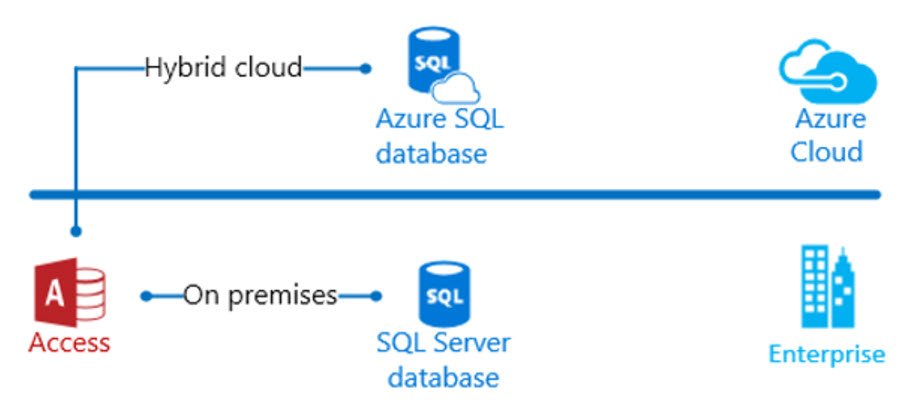
Microsoft Access with a cloud SQL database
When Microsodt Access is connected to a cloud (SQL) database, it opens up a new world of possibilities. As long as the front end is installed on Microsoft Windows, the back end cloud database will work with any other web application: the most relevant being Power Apps, Power Automate, Power BI, Power Pages and ASP.net
Scalability Cloud SQL databases are scalable, ensuring data accessibility and integrity.
High availability Cloud SQL databases offer high availability with automatic failover across zones.
Automatic backups Cloud SQL databases automatically back up data, ensuring data integrity and accessibility.
Encryption Cloud SQL databases offer encryption at rest and in transit to safeguard sensitive information.
Secure access The Cloud SQL Auth proxy provides secure access to Cloud SQL instances without the need for authorized networks or SSL configuration.
Open standards Cloud SQL connectors are built on existing database driver standards, making them easy to use.
Private IP A private IP can be used to connect from other resources with access to a Virtual Private Cloud (VPC). Connections over private IP typically provide lower latency and limited attack vectors.
Built-in services Cloud SQL offers many services, including backups, high availability and failover, network connectivity, export and import, maintenance and updates, monitoring, and logging.
ChatGPT said:
By combining Microsoft Access with a cloud-hosted SQL database, organizations can bridge the gap between traditional desktop solutions and modern cloud-based architectures. This hybrid approach allows users to maintain the familiar interface and rapid development capabilities of Access while leveraging the scalability, security, and accessibility of cloud infrastructure. It enables seamless data sharing between Access and cloud-native tools like Power Apps, Power BI, and Power Automate, fostering unified data experiences and real-time collaboration. This setup not only modernizes legacy systems but also supports digital transformation efforts by enabling centralized data management and integration across diverse platforms.
Apps built with Power Apps bring advanced business logic and workflow capabilities, enabling organizations to transform manual processes into efficient, digital, and automated workflows. These apps are designed with responsiveness in mind, ensuring a seamless user experience across browsers and mobile devices, including phones and tablets. Power Apps democratizes app development by empowering users to create feature-rich, custom business applications without the need for coding expertise. For professional developers, Power Apps offers an extensible platform, allowing them to interact programmatically with data and metadata, implement complex business logic, create custom connectors, and integrate with external systems. Additionally, Power Apps integrates with Microsoft Copilot, an AI-powered assistant that helps you design apps by simply describing your needs. With Copilot, you can refine designs, add automation, and write code effortlessly, making app creation faster and more intuitive.